
Il Verbatim MediaStation Pro è un lettore multimediale con hard disk integrato da 500 Gbyte. Il lettore supporta praticamente tutti i formati audio e video di compressione digitale tra cui MPEG 1,2,4/MP4/divx 3,4,5,6/HD-MPEG2/SD-MPEG2/XviD (eccetto GMC, applicata l'opzione Qpel)/WMV9 (WMV)/TS/TP/TRP/ISO/IFO/VOB. Anche la parte audio è pienamente supportata grazie alla compatibilità con i formati MP3/ WMA/ WAV/OGG Vorbis/AAC e completa è anche il supporto ai formati immagine con i classici JPG/JPEG/PNG/BMP.
Unpacking
Come si vede dalla foto sotto
-thumb-500x375.jpg)
il prodotto si presenta in una bella scatola di colore nero. L'interno contiene il mediastation, il supporto per reggere il dispositivo, l'antenna wireless, l'alimentatore esterno, il CD con il manuale (in sei lingue, italiano compreso) e il driver USB per Windows 98/Me, il telecomando con due batterie e tutti i cavi utili per il collegamento del prodotto ai dispositivi audio/video e al pc. Sono esclusi il cavo ottico per il collegamento a un decoder dolby digital e il cavo di rete.
-thumb-500x375.jpg)
Come si vede dal retro
-thumb-500x375.jpg)
il prodotto può essere collegato ai dispositivi video tramite porta HDMI, tramite porta SVGA o, utilizzando i due forellini jack che si vedono centralmente e i due cavi in dotazione, a dispositivi con ingresso composito o con il classico RCA.
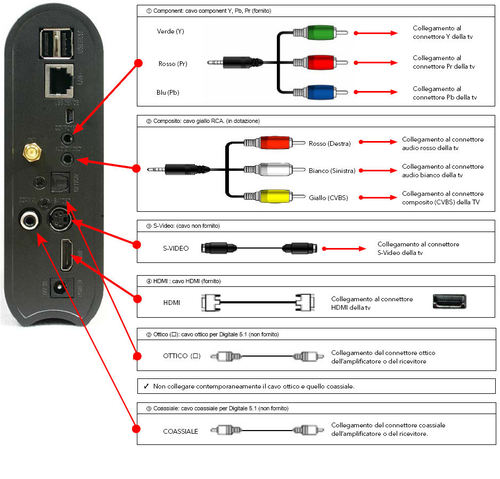
Per il collegamento alla sezione audio sono disponibili i classici canali destro/sinistro dell'uscita RCA o altrimenti, per il supporto alle tracce Dolby e DTS, sono disponibili l' uscita coassiale o quella ottica.
Per il collegamento con la parte dati il Mediastation ha un interfaccia LAN, ha una scheda wireless 802.11b/g, si può collegare ad un computer via USB e ad ha due porte USB per collegare ulteriori dischi esterni o chiavette USB.
Si può quindi aggiungere film/audio/immagini disponibili su chiavette o HD USB, si può collegare questo dispositivi via USB ad un computer che lo riconoscera come un qualsiasi hard disk esterno permettendo quindi di archiviare al suo interno i nostri film, le nostre immagini o comunque qualsiasi altro file permettendo di usare il dispositivo anche come disco di backup esterno per i nostri dati.
Inoltre sembrerebbe sia possibile, vista la presenza della connettività di rete via cavo o wireless, anche che si possano trasferire tali file utilizzando la rete. Verrebbe da dire cosi anche perchè altrimenti perchè comprare un dispositivo con supporto di rete. Vedremo tra breve che, nella fase di installazione e utilizzo, le cose non saranno tutte rose e fiori.
Installazione
La prima nota negativa che troviamo relativamente al prodotto è il manualetto cartaceo contenuto all'interno della confezione e chiamato "quick start guide". Di solito la quickstart guide è l'unica cosa che si guarda perchè contiene gli schemi e gli step passo passo per attaccare il dispositivo agli altri apparati con lo schema di collegamento dei cavi tra i dispositivi e lo startup del dispositivo.
Questo manualetto invece, seppur tradotto in diverse lingue, contiene il nulla. Due paginette con i requisiti di sistema, le limitazioni di garanzia e i riferimenti all'assistenza tecnica
-thumb-500x375.jpg)
Mi aspettavo sinceramente altro da questo tipo di manuale ma comunque questa piccola pecca è bilanciata da un ottimo manuale sul CD che spiega per filo e per segno come collegare il mediastation sia nella parte audio/video sia che per la parte di rete.
E ora iniziano i dolori.
Abbiamo il Mediastation funzionante. Come ci metto i film? Ovviamente potrei collegarlo via USB al computer e mettere i film sul suo Hard disk ma visto che il dispositivo ha, come detto sopra, delle interfacce di rete voglio poterlo usare come network attached storage.
La prima idea, una volta identificato l'indirizzo ip ottenuto dal dispositivo dal server DHCP della mia rete, è quella che esso abbia su condiviso, via risorse di rete, l'intero disco interno ma purtroppo una ricerca di condivisioni sull'ip del mediastation rivela non esserci alcun server di rete attivo.
Un po' di navigazione all'interno dei menu di setup fa ben sperare vista la presenza di protocolli quali SAMBA, FTP, NFS e uPNP. Ma dopo un po' mi accorgo che in realtà tutta questa roba serve per vedere eventuali condivisioni esterne nel senso che se sulla rete c'è una condivisione samba, ftp, nfs con dentro film, immagini suoni, il mediastation, permette di eseguire tali file remoti e quindi permette di vedere sul grande schermo i film e tutti i contenuti multimediali condivisi sulla rete e la cosa sembra anche funzionare molto bene visto che il mediastation immediatamente identifica e rende disponibili tutte le condivisioni presenti sul mio computer di casa. Una utile funzionalità, ma non è quella che mi interessa attualmente. Come metto i film sull'hard disk interno al mediastation.
Una voce "Server FTP" mi fa ben sperare, anche se poi sarò costretto ad usare un client FTP, sempre meglio che dover avere sempre il dispositivo vicino al computer collegato in USB. Imposto i dati e mi collego da remoto. Sembra funzionare, se nonchè qualsiasi tentativo di andare in scrittura fallisce. Sembra come se il dispositivo sia montato in sola lettura in quanto qualsiasi tentativo di scrittura ottiene come risposta un "accesso negato".
Sconfortato dopo ulteriori prove, visto che anche il manuale lo consiglia, provo a vedere se c'è un aggiornamento di firmware sul sito della verbatin ma non trovo NESSUNA informazione in merito al mio prodotto. Ancora più sconfortato mi appoggio a google che mi ritorna un link a questa discussione sul forum di hardware upgrade su cui vengo a scoprire molte cose interessanti.
Guardate l'immagine sotto. Vi è familiare?
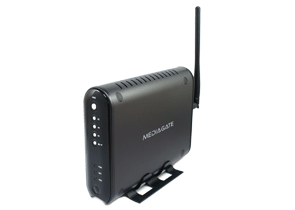
Ma si, è il nostro Verbatim Mediastation Pro. E invece no. E' il MEDIAGATE MG-350SHD della A.L. tech.
Cosa hanno fatto quindi quelli di Verbatim? Hanno preso un prodotto di terze parti e lo hanno, come si suole dire, rebrandizzato. Fino a qui niente di male se non fosse che il Mediagate ha il supporto per il NDAS che è un'evoluzione del NAS sviluppata dalla Ximeta che, seppur come implementazione proprietaria, permette di vedere lo storage remoto addirittura come se fosse un disco locale.
Allora se il Mediastation e il Mediagate sono la stessa persona perchè nel Mediagate non trovo il supporto al NDAS?
Lo si scopre dando un'occhiata alla versione del firmware del modello Verbatin
-thumb-500x375.jpg)
che contrasta fortemente con l'ultima versione di firmware dell'originale che si vede essere la 1.1.11. Cos'è allora la 1.1.12 presente nel mio modello? Molto probabilmente la rebrandizzazione del prodotto non è stata fatta solo all'esterno ma anche all'interno con una versione di firmware appositamente creata da Verbatim. Solo che in questa versione il supporto al NDAS NON è stato messo.
Ora, dato che per me, ma credo che anche per voi, il supporto al NDAS è indispensabile, vediamo come rimetterlo riportando il prodotto "alle origini" inserendo il "vecchio" firmware originale.
Aggiungere il supporto NDAS al MediaStation Pro della Verbatim
Per fare questo scarichiamo il firmware 1.1.11 dal sito della A.L. tech e piazziamolo su di una chiavetta USB formattata in VFAT/NTFS. Inseriamo quindi la chiavetta su una delle due porte del Mediastation. Per far vedere la chiavetta ho dovuto spegnere e riaccendere l'apparato. Una volta identificata la chiavetta entriamoci e posizioniamoci con il cursore sul file di aggiornamento
-thumb-500x375.jpg)
e iniziamo l'aggiornamento premendo sul pulsante OK del telecomando.
Al termine dell'operazione, spegnendo e riaccendendo il Mediastation esso magicamente si trasformerà nel Mediagate.
-thumb-500x375.jpg)
dove finalmente è presente, nel setup, la voce DNAS che è quindi possibile attivare.
-thumb-500x375.jpg)
Da notare anche lo skin verde della versione originale contrapposta allo skin blue di quella brandizzata. Voi quale preferite? Io questa qui  .
.
A questo punto basta scaricare il supporto NDAS per Windows XP/Vista sul PC e tutto è finito? Purtroppo non è cosi perchè a metterci lo zampino c''è di nuovo la brandizzazione Verbatin.
Per montare il dispositivo remoto via NDAS è infatti necessario conoscere due parametri univoci del dispositivo, il suo ID e la cosidetta "Write Key". Nel manuale del Mediagate c''è scritto che tali valori si trovano su di un etichetta posta sotto al dispositivo. E nella versione brandizzata da Verbatim? Nessuna traccia di questa fottutissima etichetta.
Come fare allora? Ci viene in aiuto NDASSCAN, un software sviluppato da un tizio a cui va la mia più grande ammirazione, che, utilizzando i driver della Ximeta cerca i dispositivi NDAS sulla rete estraendo le due informazioni che ci servono.
Ma ancora qualche problemino prima di giungere alla fine di questo calvario. L'NDASSCAN necessita delle librerie winpcap, e fin qui poco male, ma è stato sviluppato per la versione 3.11 dei driver Ximeta attualmente disponibili nella versione 3.40 quindi incompatibile. Inoltre NDDASCAN cerca tale libreria in C:\Program Files\NDAS\System mentre sappiamo benissimo che nei sistemi italiani i driver saranno installati nella cartella C:\Programmi\NDAS\...
Vediamo quindi come fare a uscire da questo affosso.
Scarichiamo e installiamo la versione 3.11 dei driver NDAS (icio60, in un commento, mi fà notare che la 3.11 non è più disponibile sul sito Ximeta. Potete quindi trovare questa versione qui.). Alla fine dell'installazione creiamo la cartella C:\Program Files e copiamoci l'intera cartella C:\Programmi\NDAS\.
Scarichiamo NDASSCAN e salviamolo direttamente in c:\program files\NDAS\System.
Lanciamo NDASSCAN
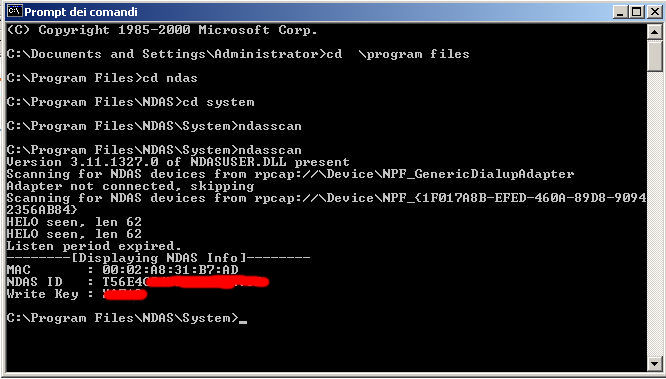
salviamo i dati dell'ID e della wirte key, cancelliamo la cartella C:\Program Files creata e disinstalliamo i driver vecchi di Ximeta.
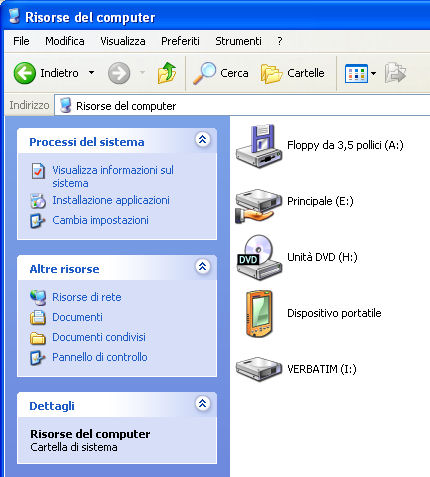
Installiamo quindi i driver aggiornati. Apparirà nella system tray l'icona del NAS Device Management, tasto destro e "Register new device". Completiamo tutti i campi richiesti e il risultato sarà FINALMENTE un nuovo disco su risorse del computer.
Conclusioni
Che dire? Che se Verbatim si fosse fatta i ca**i suoi, sarebbe un ottimo prodotto e lo è ancora a patto di seguire la guida sopra, altrimenti resta il solito dispositivo USB esterno da spostare di volta in volta che vogliamo vedere un film in TV.



Senza parole. La guida piu' utile mai esistita di un oggetto inutile 😛
Beh, tieni conto che ho già trovato 5 thread in differenti forum e uno su usenet riguardo a questo problema. Ora sto ovviamente e adeguatamente spammando 😀
Semplicemente Grazie!
WINDOWS VISTA
Ho provato la tua procedura su Windows Vista.
Ti posso dire che in questo caso non è necessario creare "Program Files".
Anche perchè se provi a crearla ti dice che esiste già !!
Al termine della procedura quando, finamlmente il disco F risulta montato, mi ha chiesto di FORMATTARLO !!
E' capitato anche a Te ?
Ho seri dubbi su procedere o meno alla formattazione, anche perchè avendo cambiato il firmware penso di avere automaticamente perso la garanzia.
Qualcuno ha provato ?
Ha proposito di FTP.
Funziona, ma usando direttamene i comandi da finestra DOS.
Sono riuscito a creare una directory e a copiare dei file.
Qualcuno ha trovato un FPT explorer che opera bene con la Mediastation ?
Ciao. E' ovvio che ci sono dei casi in cui c:\program files esiste già. In tutte le versioni di Windows in INGLESE è quella la posizione standard dove vengono installati i programmi. In quel caso non esiste c:\Programmi. Ovviamente per le versioni in Inglese non si deve fare quella parte della procedura ne tanto meno, ovviamente, cancellare c:\program files alla fine.
Per quanto riguarda la formattazione, pure il manuale dice che in alcuni casi potrebbe essere necessario formattare il disco. Se non hai già dei dati dentro io lo formatterei tranquillamente in VFAT.
quanto tempo e' durata questa bella sessione di hack? 🙂
un paio di orette della mattinata di ieri dal momento in cui ho capito che stavo lottando contro i mulini a vento con la versione brandizzata
ciao, perchè sbrandizzare il verbatim e perdere sicuramente la garanzia?
Io ho risolto, per quel che mi serve, con Core FTP.
Carico i files sul disco con un semplice comando e con un po di pazienza il risultao è ottimo.
Cosa mi perdo non usando NDAS?
Comunque ottimo lavoro e complimenti per la descrizione.
saluti
Ciao
Non volevo entrare sul tecnico.
Volevo solo precisare che per chi ha Vista (anche in italiano) non c'è bisogno di creare "Program Files", anchè perchè è impossibile.
Con Vista vengono utilizzati i Junction Point di NTFS per far vedere "Program Files" come se fosse "Programmi" così si mette insieme "Capra e Cavoli" risolvendo i vari casini dei programmi di installazione.
Per quanto riguarda la formattazione ho tenuto duro e dopo vari tentativi di mount/unmount finalmente si è messo a funzionare.
Adesso riesco a vedere un film su TV e contemporaneamente su PC via WiFi.Fantastico!
Così può essere un vero MediaServer!!
Comunque ancora non mi spiego coma mai funziona solo con i comandi FTP da finestra DOS e non con altri programmi. Ho provato FileZilla e la possibilita' di Vista, mi sembra anche di XP, di crere dischi di rete su FTP.
Grazie ancora.
Pensavo di aver buttato 165 euri
dove l'hai comprato e quanto costa il dispositivo?
@velner
Si, sicuramente l'FTP era una alternativa, ma come ho anche scritto nell'articolo, a me non ha funzionato perchè mi dava il disco montato in sola lettura.
Comunque, a parte la velocità, vuoi mettere la comodità di avere il disco direttamente montato su risorse del computer e accessibile come unita X: piuttosto che dover usare un programma "esterno" quale l'FTP?
@Marco Pelle
Ah, non usando vista, non conoscevo questa funzionalità dei "junction point". Meglio cosi 😀
@Simone
Io l'ho comprato direttamente da un fornitore pagandolo 110 euro + iva. Il costo all'utente finale non saprei ma @Marco Pelle in un commento precedente dice di averlo pagato 165 euro per cui direi che è quella la cifra approssimativa del prodotto all'utente finale
Salve, anche io ho comprato il Mediastation di Verbatim non la versione pro, sempre con harddisk da 500Gb ma senza antenna wireless, pagato €. 129. Anche io l'ho connesso tramite ethernet (LAN) direttamente nel router fatto questo ho installato il programma "ndas-3.10.1230-setup-enu-full.exe" presente nel cd della confezione, e inserito il codice ID e la write key, nel mio caso erano presenti scritti in una etichetta attaccata dietro all'apparato vicino alla connessione ethernet, fatto questo, mi è apparso da risorse del computer VERBATIM(X:) e da li ho iniziato a trasferire i file. Comunque io non ho avuto alcun problema nella configurazione del tutto. L'unica cosa che o notato è che il trasferimento dati via LAN è un po lento.
Ciao.
Anche io come Alessio ho acquistato la versione base del Mediastation.
A parte i possibili problemi di connessione (che magari avrò quando tenterò la connessione LAN), ho notato che con diversi DivX il video va a scatti.
A voi non è capitato lo stesso problema?
Lo stesso video, sempre salvato sul mediastation, ma riprodotto tramite il pc (mediaplayer o VLC) non da nessun tipo di problema.
Potrebbe essere il firmware? Codec non aggiornati?
Se può fare comodo posso postare le caratteristiche di un video che salta moltissimo.
Grazie.
Luca.
Se mi dici che video è, anche in priv, via e-mail, lo provo anch'io e vediamo che succede
Ti ho mandato una mail all'indirizzo di posta che ho trovato sulla tua home (info@ebruni.it).
Grazie.
Salve, confermo anche io la versione di Luca. Anche io come lui ho trovato dei file video che scattano.
Ciao.
Carissimo capitano Bruni, ho seguito passo per passo le sue dettagliate istruzioni, ho lanciato un ping all'IP della Mediastation e mi ha restituito regolarmente i quattro pacchetti, nonostante ciò, quando lancio NDASSCAN dal prompt di dos (c:\Program Files\NDAS\system\ndasscan) mi restituisce 'No NDAS HELO packets receved'. Può darmi, cortesemente, il suo parere ancora una volta? Molte grazie.
Enrico
Ma nel setup, l'NDAS è abilitato come si vede in questa schermata qui
https://blog.ebruni.it/blog/2008/11/07/IMG_4329%20(Large)-thumb-500x375.jpg
cioè, è impostato "NDAS Support" su ON?
Salve a tutti,
il fatto che Alessio abbia il mio stesso problema mi solleva almeno un pò, il mio Mediastation non è difettoso!
Mi chiedo, se il Mediastation Pro è l'alterego Mediagate MG-350SHD, magari il Mediastation normale è la copia del MG-35S... chissà cosa seccude se carico il firmware del MG-35S sul mio Mediastation... magari risolvo i problemi del video a scatti.
In più mi sembra che il MG-35S supporti delle funzioni che il Mediastation non ha, stasera leggo per bene il manuale del MG-35S e vedo cosa ne salta fuori. Sono curioso.
Ciao.
Confermo, capitano. L'NDAS di Mediastation Pro è su ON. Per sua ulteriore informazione, sono collegato in wireless.
Grazie.
Enrico
Ciao a tutti. Anche io ho acquistato il Mediastation non Pro (109 € all'ipercoop a Torino). Per ora sono soddisfatto e non ho avuto problemi di riproduzione; non mi è ancora chiaro se riesce a riprodurre video in alta definizione oppure se si limita all'upscaling.
A me il video andava a scatti con con gli avi xvid packed bitstream. Rimuovendo il PB il video è perfetto.
Per rimuovere il PB uso MPEG4Modifier dopo aver verificato con gspot.
Ciao.
Salve Capitano
non riesco a vedere il mio PC dal Mediastation, forse c'è qualche settaggio FTP che mi sfugge.Sono collegato in Lan con una scheda 10/100 e uso coreFTP per la connessione.
Da pc nessun prob. trasferisco i files ad ottima velocita, circa 15 min per 1 Gb, ma se voglio vedere il mio pc dal Vebatim mi dice 'impossibile connetersi al server '.Ho provato più volte i settaggi delle scarne istruzioni allegate ma niente da fare, non vede neanche la connessione internet, quindi non va neanche la radio.
Sapresti darmi la soluzione? ti ringrazio anticipatamente e buon weekend.
Boh, visto che allora, l'unica differenza fra me e te è che io ho solo usato il wired, prova ad accedere con il cavo di rete e vedi che succede.
Se cerchi di vedere dal Mediastation il tuo PC via FTP allora sul PC devi avere attivato un SERVER FTP. C'è l'hai attivo un SERVER FTP sul PC? Non credo ;-D
Comunque non capisco perchè cercare di accedere al tuo PC tramite FTP. A me il Mediastation ha visto immediatamente tutte le mie condivisioni di rete Windows via SAMBA/NetBEUI anche nella versione di firmware originale brandizzata da Verbatin anzi, era l'unica cosa che funzionava.
Ti consiglio quindi di lasciare perdere l'FTP nella comunicazione dal Mediastation al PC e di condividere le cartelle.
Il consiglio vale anche se usi Linux sul PC.
Ciao a tutti,
leggo con interesse il commento di Carlo.
Potresti essere più preciso sul "xvid packed bitstream"?
Come faccio a riconoscere i film che lo hanno con gspot?
Suppongo poi che MPEG4Modifier abbia un apposito comando per rimuovere il PB,vero? E' una cosa semplice?
MPEG4Modifier è un programma free? Non lo conosco.
Grazie.
Ciao Capitano,
in effetti non avevo installato nessun server FTP sul PC, installato, configurato e visto da Mediastation ma non è quello che volevo.
Il file transfer lo facevo già, e a quanto pare non fa altro, avevi ragione.
Io volevo eseguire i file del PC da Mediastation senza doverli caricare tutte le volte.
Pensi sia possibile? Grazie per la disponibilità.
Saluti
Si certo. Funziona benissimo anche nella versione originale di Verbatin. Basta che condividi la cartella che contiene i film con la classica condivisione di rete di Windows.
Ho seguito tutto il procedimento, ho un problema però (forse dovuto alla mia incompetenza):
premetto che ho windiws vista
quando lancio ndasscan mi dice:
C:\Program Files\NDAS\System>ndasscan
Version 3.11.1327.0 of NDASUSER.DLL present
Error in pcap_findalldevs: No interfaces found! Make sure libpcap/WinPcap is pro
perly installed on the local machine.
Packet sniffing failed.
cosa devo fare?
ndasscan richiede le winpcap. Per cui prima di eseguire la procedura è necessario installarle. Le puoi trovare qui: http://www.winpcap.org/
Sviluppata da tizi del politecnico di Torino, quindi è roba nostrana 😀
Ho visto il film consigliato da Luca che dice che a lui va a scatti. A me si è visto benissimo e completamente fluido anche durante le scene più spine. Quindi per me assolutamente zero problemi. Finora tutti i film visti sono perfetti con tracce audio dolby 5.1 e DTS e video MPEG2 e DivX.
Ho seguito passo passo le tue indicazioni... ma ho un problema (immagino dovuto alla mia incompetenza) e ti chiedo aiuto:
quando vado a lanciare ndascan mi dice questo:
C:\Program Files\NDAS\System>ndasscan
Version 3.11.1327.0 of NDASUSER.DLL present
Error in pcap_findalldevs: No interfaces found! Make sure libpcap/WinPcap is pro
perly installed on the local machine.
Packet sniffing failed.
Mi puoi aiutare?
il problema è appunto che ho installato winpcap e fa così cmq
Ah. Allora la questione è seria. Mi sa che c'entra qualcosa Windows Vista (come al solito). Non ti riesce di attaccare alla rete un Windows XP e provare con quello?
no purtroppo al momento non riesco a fare questa prova
Buonasera a tutti,
Carlo ha ragione, il problema del video a scatti è da attribuire al "packed bitstream" e non si verifica solo con il Mediastation ma con diversi riproduttori di file Xvid.
Essendo un utente Ubuntu, ho rimosso questo tipo di compressione (AVI, decompr. VOP) con Avidemux. Rimossa la compressione i file diventano fluidi al 99%.
Probabilmente il Mediastation Pro ha il firmware più aggiornato e supporta questo tipo di file.
Grazie,
Luca.
Ma è possibile intervenire sulle impostazioni del baracchino senza per forza doverlo collegare ad una TV???
ciao
Se non lo avessi visto di persona ti avrei risposto: "ma sicuramente si, ci sarà sicuramente un'interfaccina web per gestire l'accrocco da remoto".
E invece no. L'unico modo per configurarlo è collegarlo alla TV e andare nel setup.
Grazie emiliano, la guida è una bella dritta...posso eliminare il post di aiuto che avevo appena fatto stamattina su HWupgrade 😉
Solo una cosa...nel mio pc la fase di login di winzozz si è rallentata parecchio, ovvero prima di arrivare alla finestra di login, resta molto sulla fase subito antecedente, dove compare la scritta l'altra finestrella di winzozz con scritto...bho, nn ricordo di preciso.
Cosa che nn è successa invece nell'altro notebook di rete dove ho esguito la stessa procedura...mha, misteri.
ciao,
andrea
Chiedo scusa prima di sbrandizzare e perdere la garanzia il trasferimento è più veloce in FTP o NDAS??
Boh, io non sono proprio riuscito a far funzionare l'FTP per uploadare file sul MediaStation per cui non so che dirti.
per Ciroslitz
io con l'FTP trasferisco a circa 1.5Mb/s via rete. NDAS non ho ancora avuto il coraggio di provarlo per il tuo stesso motivo, la garanzia.
Saluti
Seguendo la procedura che mi ha detto un utente "risorse del computer e nella barra dell'indirizzo digita ftp://altechuser@192.168.0.50 (sostituisci la parte finale con l'indirizzo del tuo Media Station), ti verrà poi chiesta la password.... riesco a sfogliare e trasferire anche senza filezilla.....
unico dubbio a quanto trasferite con ndas?
Ho seguito la procedura ma nel far partire il NDASSCAN vi da questo messaggio. Dove sto sbagliando? Il disco e configurato in wireless e riesco a vedere cartele condivise sul mio server. Grazie mille per il vostro aiuto.
C:\Program Files\NDAS\System>ndasscan
Version 3.11.1327.0 of NDASUSER.DLL present
Scanning for NDAS devices from rpcap://\Device\NPF_GenericDialupAdapter
Adapter not connected, skipping
Scanning for NDAS devices from rpcap://\Device\NPF_{E7FF951D-AD4E-4DD4-9390-6F9B
651EC1CB}
Listen period expired.
Scanning for NDAS devices from rpcap://\Device\NPF_{45C3A011-1F2D-4228-8975-9F8B
367A6232}
Listen period expired.
-------
No NDAS HELO packets received
C:\Program Files\NDAS\System>
Problema risolto in questo modo: collegamento LAN funziona perfettamente, collegamento Wireless la NDAS Device rimane Offline. La rete è a posto, il disco vede le cartele condivise e il mio monitor di rete vede il disco. Qualche consiglio? Grazie
Mi sembra ci sia un commento simile con lo stesso problema. La cosa in comune è che tutti e due siete in wireless. Ti riesce di fare la prova via cavo e vedere che succede?
Ah, ecco. Allora avevo ragione. Per il Wireless non sò. Forse qualcosa nella latenza o qualche configurazione strana sull'access point
Io sono intenzionato a comprare la versione pro; l'unico dubbio che mi rimane è la versione della porta HDMI; sul mio LCD ho solo ingressi 1.3 e non ho ancora capito se sono compatibili con le versioni precedenti oppure no. Forse qualcuno di voi è in grado di farmi capire come funziona? Il m io lcd è un samsun LE40A558. Grazie a tutti, Andrea
Ieri ho installato alcuni aggiornanenti di Vista che mi hanno permesso di poter utilizzare la libreria winpcap da così poter scoprire il ndas id e la write key... ora va tutto perfettamete.
Ti ringrazio per questa guida utilissima 🙂
Ciao a tutti. Ho eseguito la procedura descritta su due pc differenti, uno con vista, l'altro con xp. In entrambi i casi va tutto ok, senonche' quando inserisco l'NDAS ID e la WRITE KEY, il software cerca e trova il device, ma mi restituisce questo messaggio: "there is no mountable NDAS device at this time".
Ed infatti, nel menu del device, appaiono le voci "deregister" e "properties", ma non quelle per montare l'hd. Qualcuno ha idee del perche'? Ovviamente ho provato sia via wireless che lan, e l'opzione NDAS della mediastation e' su on. Aiuto!
Ahhhhhhh beati voi che avete questi problemi....io... appena acquistata una Mediastation HD 500GB NDAS usb/lan/Wi-Fi Mediaplayer vado tutta felice per settarla e sorpresa sorpresa....il telecomando è morto kaput nisba. telefono in Verbatim e ci vorranno 15 gg lavorativi per cambiarlo....NON HO PAROLE!!!
Salve, ho acquistato anch'io il Mediastation Pro Wireless, le funzioni di base: rete (wireless), lettura file comuni( .avi, .mp3 etc...), sembrano a posto. Ho provato vedere qualche film in rete e mi sembra ok. Rilevo, pero', problemi nella lettura dei files tipo: .iso e .ifo (DVD). I primi non li legge dl disco locale, mentre da remoto si ma a strappi; per i secondi invece schermo nero senza risposta (dal disco locale). Il prodotto e' dichiarato compatibile alla lettura di questa tipologia di files.
Qualche suggerimento..??
Grazie
Sebastiano
Non sò se si tratta di questo ma il mio Mediastation, all'atto dell'acquisto, era formattato in FAT32 quindi non permette di inserire file maggiori di 2Gbyte e se si prova a mettere tali file vengono comunque troncati a tale valore risultando quindi corrotti.
Se tenti quindi di aggiungere e visualizzare file .iso e .ifo di DVD che sono usualmente di dimensioni superiori a 4Gbyte e anche l'HD dentro al tuo Mediastation è formattato in FAT32 allora è normale che non riesci a vederli perchè essendo troncati a 2Gbyte risultano corrotti e quindi illeggibili.
Per risolvere bisogna formattare il disco del Mediastation utilizzando l'NTFS come file system. Occhio che se hai già messo roba nel Mediastation devi prima salvartela da qualche altra parte visto che la formattazione cancella l'intero contenuto del disco.
Sebastiano, volendo è sufficiente scompattare il file .iso nelle classiche cartelle AUDIO_TS e VIDEO_TS , in questo modo i files saranno sempre di 1048.
Ma...invee, Emiliano, nessun suggerimento per il fatto che ho menzionato qualche giorno fa? Perchè pur vedendomi il device NDAS, non mi permette il mount, ed infatti in risorse del computer non vedo lettera d'unità?
Un primo dubbio, sicuramente una cavolata però meglio essere sicuri :-D. Non è che per caso il disco dentro non è formattato. Nel senso, se lo monti via USB, te lo vede?
Giustamente ,partiamo dalle basi!
Il disco è formattato, ho dentro moltissimi files, e via usb tutto va alla perfezione. Parti dal presupposto che non sono un neofita 😀
La cosa strana è che se spengo l'hd, l'icona del device nel menu è nera, se invece lo accendo è bianca.
Inoltre vede il device perchè nelle proprietà vede il mac address, ed inoltre lo status è online.
Ma il menu, maledetto, ha solo due voci: "deregister" e "properties"
Che rabbiaaaa!
Allora, a parole è difficile capirsi. Vediamo le differenze con delle immagini.
Innanzitutto la versione del programma che ho io
http://www.flickr.com/photos/27545546@N00/3091049762/
la tua è uguale? Ecco cosa vedo poi quando il Mediastation è spento
http://www.flickr.com/photos/27545546@N00/3090209649/
ecco cosa vedo quando è acceso
http://www.flickr.com/photos/27545546@N00/3091049892/
Che differenze noti rispetto a quello che vedi tu?
Intanto, grazie per l'aiuto.
Prima immagine: la versione è pressochè identica, io ho la 3.40.1604.12136, non cambia nulla.
Seconda immagine (a mediastation spento): esattamente identica
Terza immagine (a mediastation acceso): il quadratino diventa bianco da nero che era (come a te). Pero', e qui nasce il problema, le voci di menù che appaiono sono solo "deregister" e "properties". Non appaiono nè la voce "Mount (Read-only)" che la voce "Mount (Read/Write). E' quello il problema, come ti dicevo! Perchè, pur vedendolo On-line, non mi permette il mount? Tieni conto che già in fase di installazione, come detto nei messaggio precedenti, mi avvisava che "there is no mountable NDAS device at this time". Non so davvero dove sbattere la testa.
Boh, un tentativo potrebbe essere di disinstallare e reinstallare l'applicativo, ma probabilmente l'hai già fatto.
Provare ad installarlo su un altro PC in rete e vedere che succede?
Eh, già. Ti elenco le prove che ho fatto senza esito, e che mi hanno portato sulla soglia della quasi rassegnazione
1) disinstalato e reinstallato il software, anche in varie versioni
2) eseguite le prove su 3 pc diversi, sia con xp che con vista
3) formattato uno dei pc ed installato il software a pc "vergine"
L'unica cosa che potrei ancora tentare è formattare il mediastation ma devo salvare tutti i dati, e poi....potrebbe essere a causa della partizione FAT e non NTFS? Io non ne sono cosi' sicuro...
resta il fatto che, anche durante l'ultima nuova installazione del NDAS software, il messaggio finale è:
"you have succesfully registered and the NDAS device is connected. However, there is no mountable NDAS device found at this time. Please check the status from the task bar icon menu"
La domanda è proprio quella! Perchè lo connette ma lo riconosce come "no mountable" ??? Se hai idee, te ne sarò grato.
Pensi che collegare direttamente il notebook al mediastation con un cavo cross possa avere risultati?
Io neanche. Il mio ha la partizione di default FAT32.
No, proprio non sò più che prove pensare.
Non credo. Io ce l'ho attaccato tramite uno switch con altra roba in mezzo.
Che dirti....grazie lo stesso, prima o poi capirò a cosa è dovuto, e lo scriverò.
Assolutamente. Se risolvi sono curiosissimo di sapere che problema era.
Buongiorno Sig. Bruni, Le chiedo una gentilezza, come risolvo il fattore video a scatti ? Mi aiuti Gentilmente visto che ho già un pò pò di divx in HD e qualcuna và a tratti ........Verbatin MediaStation Pro Acquistato 1° ottobre 2008 . La Ringrazzzzzio anticipatamente.
Io finora non ho mai visto un filmato a scatti. Se puoi mandarmi un link (via e-mail privata) di un film che si vede a scatti provo a scaricarlo (solo per test) e fare la prova.
Come puoi veder, già sopra, nei commenti, era uscita questa cosa dei film a scatti eppure il film a cui si faceva riferimento io l'ho visto senza alcun problema
Strano a dirsi, ma mi è capitato da un amico, e la causa era un cavo hdmi scadente.
Ciao Emiliano,
ho un Medistation Pro, 500 Gb (199 euro, Ipercoop).
Mi piacerebbe sapere se esiste un modo per far leggere file MKV. Altri mediaplayer supportano questo "contenitore" e volevo sapere se c'è speranza per il Verbatin.
Grazie mille!
Dennis
Boh, non ho fatto la prova ma non mi sembra sia supportato. Se non te li vede probabilmente non è supportato e quindi non può funzionare ne ora ne mai a meno che, in futuri aggiornamenti firmware, non decidano di aggiungere tale supporto. Ma nessuno può saperlo allo stato attuale.
Se cosi fosse, (e mi riservo di fare la prova a casa con un mkv), l'unico modo che hai di vedere quei filmati con il Mediastation è quello di convertirli in altri formati.
Guida utilissima, sono giorni che impazzisco cercando di vedere il disco dalla rete......Grazie!!!!
Grazie, si sapevo che non è un formato supportato. In realtà all'interno degli mkv spesso il file video è codificato in h264 e il mediastation pro non supporta questo codec. Ho letto qua e la che, anche con aggiornamenti firmware, il chip non sarebbe in grado di supportare la decodifica.
Comunque, approfittandomi della tua gentilezza, ti chiederei se conosci (o se qualcuno conosce) un buon software per convertire.
Grazie
Dennis
Lieto di esserti stato utile. 😀
Allora, io di solito uso uno tra questi.
- Super(c) - http://www.erightsoft.com/SUPER.html
- Mediacoder - http://mediacoder.sourceforge.net/
- VirtualDub - http://www.virtualdub.org
Io ho risolto "processando" il file DivX con Avidemux (sono utente Linux).
Molti DivX hanno i dati a pacchetto compressi, per questo il video va a scatti. Una volta che rimuovi questo tipo di compressione il tutto risulta fluido.
Se cerchi ad es. su google packed bitstream vedrai che ci sono tantissimi post.
Salve a Tutti, come Luca anch'io ho il mediastation alias MG-35S. In particolare ho notato che, mentre nel manuale verbatim non si fa riferimento ai file .iso, l'MG35S pare li supporti. Sinceramente non ho fatto alcuna prova, ce l'ho da pochi giorni. Qualcuno ha già provato?
Chiedevo a Luca se poi ha provato a usare il firmware della mediagate e come va. grazie
Si sa se, per la Verbatim Medistation o AL Tech Mediagate che dir si voglia, qualcuno stia sviluppando firmware alternativi magari per caricare un sistema linux?
x Massimiliano, attenzione c'ho sbattuto anch'io... di default l'NDAS è disabilitato sulla Mediastation, vai nella configurazione della rete ed attivalo! Spero sia solo questo, o almeno così ho risolto il mio problema... piuttosto per chi ha formattato in NTFS, la Mediastation non ha nessun problema a leggere da questo file system?
Grazie
Mi rispondo da solo 🙂
Una volta riformattato in ntfs, anche il mediastation "non pro" legge tranquillamente i file .iso Evviva!
Ottima notizia. Io ero uno di quelli che non si era accorto del FAT32 e avevo messo già roba nel mediastation ma ora ero tentato, questo week, di copiare tutto su un altro HD e riformattare tutto in NTFS ma avevo qualche dubbio.
Ora me li hai tolti.
Grazie Guglielmo ma....è attivato eccome. L'unico ed ultimo ostacolo potrebbe essere il fatto che siano tutti collegati all'hug fastweb, non so che tipo di gestione ne faccia. Appena metto mano su un router normale faccio la prova. 🙂
Massimiliano, hai mica software quali firewall personali attivati? o magari quello di XP/Vista? hai provato a disabilitarli? a volte anche gli antivirus hanno funzioni di firewall... prova un pò...
Ciao e buona fortuna
sono senza parole l'ho pagato 239.00 euro in negozio per prim cosa ho notato che non sono riuscito a farlo funzionare senza collegarlo al computer. 2 l.ho provato e mi sembra che funzioni. 3 entro in internet e leggo. dopo che ho letto tutto compreso i commenti mi son chiesto gira che ti gira . io mison preso una gran inc... e ho acquistato una stronz.... comunq spero di no in tutti e due casi. sara' ottimo o no?
Buon Natale e ciao a tutti.
Ho un mediastation che avevo configurato e funzionante con ndas. Da ieri sera a seguito di un blocco in visione di una fotografia (utilizzandolo guardando film e foto sul televisore ma sconnesso dalla rete) l'ho dovuto spegnere togliendo l'alimentazione. Adesso posso accedere al disco solo tramite cavo usb , leggo i dati e vedo il contenuto (sul pc) ma non riesco più a collegarlo al televisore ( quindi niente setup) e nemmeno tramite rete perchè sul box resta acceso il led (blu) power lampeggiante, il led power (rosso ) lampeggiante ed il led h.d. lampeggiante . Ho come la sensazione che si sia danneggiato qualche parte di sw che controlla l'uscita verso la periferica tv, ma non ho idea di come ripristinarlo o dove reperirlo......Qualcuno può aiutarmi prima che lo butti fuori dalla finestra sotto un camion ? (avevo il dubbio di aver fatto un acquisto poco buono , ora ne sono sicuro) . Grazie a chi vorrà aiutarmi.
La prima cosa che mi viene da suggerirti è di provare a ributtare dentro al Mediastation il firmware, brandizzato o quello originale.
Era successo anche a me.
Se hai il cavo usb connesso al pc. Staccalo, spegnilo e riavvilo senza cavo usb, a questo punto dovrebbe ripartire correttamente! 🙂
Ciao Ragazzi, ho appena acquistato un Mediastation 500 Gb e ho visto che è formattato in FAT32, io però ho la necessita di avere l'HD in NTSF, per copiarvi file piu grandi di 4 GB, per non creare danni, chiedo prima a voi che sicuramente avete già eseguito qualche formattazione il NTSF, veniamo al dunque, se formatto l'HD, rischio di perdere il software preinstallato per l'utilizzo del Mediastation con la TV? il software che una volta collegato il Mediastation alla Tv, consente di eseguire il setup e navigare tra i vari menu, per poi accedere alle varie cartelle per visualizzare Film, Foto, Etc... per capirci, oppure posso tranquillamente formattare senza il rischio di perdere il suddetto software? se qualcuno è così gentile da darmi una risposta chiarendomi i vari dubbi, grazie e Buon Anno
ciao marco anche io adesso mi sono accorto dello stesso problema se formatto da fat a ntsf funzionano sempre le funzioni che aveva precedentemente il media se hai risolto mi rispondi grazie maurizio
Marco mi fai sapere come hai risolto ho lo stesso tuo problema grazie maurizio
due mesi fa,appena acquistao, ho formattato in NTSF, non si perde niente e tutto funziona regolarmente, cosi puoi trasferire un intero DVD senza prob. Se hai già parecchia roba già caricata potrebbe essere un po piu lunga e rischiosa la procedura.
Ciao Capitano
non si riescono più a scaricare i driver NDAS ver. 3.11.
Sul sito Ximeta sono disponibili solo quelli aggiornati (3.40, 3.41).
Come fare?
P.S.: per il momento mi arrangio con FileZilla ma è una pena perchè si ripete continuamente il messaggio:
Risposta: 530 Server is busy, sorry.
Errore: Errore grave
Errore: Impossibile collegarsi al server
Solo dopo svariati tentativi riesco e trasferire (wireless)un file alla volta.
L'assistenza Verbatim brancola nel buio più totale.
Grazie per la segnalazione. Ho aggiornato l'articolo con un link alla versione 3.11 funzionante.
Grazie Velner dell'informazione, allora posso tranquillamente formattare in NTSF, copiarvi Film e DVD e vederli tranquillamente in TV mantendendo le caratteristiche di utilizzo come HD e di Stazione Multimediale con le varie opzioni a menu per la ricerca e visualizzazione dei file?
Grazie nuovamente
Vai tranquillo, le noie le da da solo con le varie impostazioni di rete che non sono delle più brillanti, contrariamente da come se lo vende Verbatim. Io lo uso in FTP altri in NDAS.Comunque sono abbastanza soddisfatto dell'oggetto, per il momento fa quasi quello che chiedo, in attesa di un nuovo firmware.
BUON ANNO A TUTTI.
ho letto con piacere la guida,che oltre a essere ben fatta è anche supportata da buoni commenti.
io ho preso il Verbatim Mediastation (senza WI-FI), ho già caricato parecchia robetta via usb e scopro di non aver verificato la formattazione, se fosse stata in FAT32 o NTFS...pazienza, se sarà necessario riformatterò il disco e ricaricherò i film.
ora però mi sto scervellando con la connessione FTP.
ho installato il suo software NDAS, messo le opportune key, lo registra col nome di default ma se guardo le proprietà della periferica non trovo nessun HD installato (che sia colpa della formattazione ? non penso!); anche in risorese del computer non trovo nessuna nuova periferica.
ho provato anche Filezilla (che già uso per gestire un sitoweb) ma non saprei che parametri usare per il login (ho provato quelli di Altech ma non vanno bene)
il parametro NDAS è in ON, l'IP è statico e risponde al ping, insomma, mi sono dimenticato qualcosa ??
grazie Valter
Ciao e auguri di buon anno!
Ho un problema
Ho avuto la sventurata idea di acquistare un Mediastation pro, proprio l'ultimo dell'anno. Vabbè ormai è andata.
Ho avuto gli stessi problemi riscontrati sull'articolo pubblicato nel blog.
Ho seguito fedelmente le istruzioni che riportavi e fino all'aggiornamento del firmware tutto ok.
Il problema è avvenuto nella fase successiva: ho scaricato il software e le librerie seguendo passo passo le istruzioni, mi si carica Ndas. Dal prompt dio dos lancio ndasscan ma l'applicazione, dopo tutta la routine, mi scrive la seguente stringa: "Listen period expired"
"No NDAS HELO packets received"
e con questo non riesco a vedere npè il NDAS device ID nè tantomeno la write key.
Puoi aiutarmi? Dove ho sbagliato?
Un caloroso saluto
Giancarlo